What counts as a critical flow?
A critical flow is a sequence a customer must complete for the product or business to work. It has a clear start, a small number of decisions, and a finish that can be observed.
- A visitor creates an account and reaches the first useful screen.
- A trial user upgrades and sees the correct paid state.
- A customer submits a booking and receives confirmation.
- A team owner invites a colleague who can accept and enter the workspace.
- A buyer completes checkout without duplicate payment or lost state.
Write the finish line before opening the browser:
Starting from [entry state], the user can [action], and finishes with [visible result plus stored state].
The 90-minute test plan
| Time | Work | Evidence to keep |
|---|---|---|
| 0 to 10 min | Define the start, finish, account state, test data, and authorized environment. | One written success sentence and the exact URL. |
| 10 to 30 min | Run the happy path once without deliberately breaking it. | Completed steps, browser, viewport, and final state. |
| 30 to 55 min | Test validation, failure, retry, refresh, back navigation, and interrupted state. | Exact action that caused each difference. |
| 55 to 70 min | Repeat the same outcome at one mobile viewport. | Clipping, blocked controls, hidden totals, and changed behavior. |
| 70 to 80 min | Repeat the highest-risk action to check duplication and persistence. | Network or visible state showing whether the action ran twice. |
| 80 to 90 min | Turn reproduced defects into a prioritized repair queue. | Steps, expected result, actual result, impact, and retest rule. |
Run these checks in order
- Confirm the starting state. Record whether the user is signed out, signed in, invited, on a trial, or already paid. Hidden account state can make the same screen behave differently.
- Complete the simplest valid path. Use ordinary data first. If the expected path already fails, preserve that clean reproduction before exploring edge cases.
- Challenge every required input. Try empty, malformed, duplicate, expired, and corrected values. Check whether the message identifies the field and whether the user can recover without losing other work.
- Interrupt the journey. Refresh, go back, open a second tab, or resume after a short pause. Confirm whether progress, totals, selections, and authentication remain coherent.
- Force one safe failure. Use an invalid coupon, declined test payment, expired invitation, or other authorized failure state. The user should receive a useful message and a reliable retry path.
- Repeat the irreversible action. Double-click, retry after delay, or revisit the confirmation URL. A repeated request must not create duplicate orders, invitations, bookings, or charges.
- Use one mobile viewport. Check the same outcome, not a separate visual tour. Focus on fixed headers, keyboard overlap, clipped totals, disabled scrolling, and controls that move out of reach.
- Verify the finish line. Confirmation text is not enough. Confirm the account, order, subscription, booking, invitation, or other stored state matches what the interface claims happened.
Prioritize by customer impact
Severity should answer what the defect prevents, not how dramatic the screenshot looks.
| Priority | Use it when | Example |
|---|---|---|
| Blocker | The intended customer cannot finish and has no reasonable workaround. | Payment succeeds but the account never receives the paid entitlement. |
| High | The flow can finish, but money, data, trust, or a large group of users is at risk. | Retrying a slow checkout can create a duplicate order. |
| Medium | The defect causes confusion or extra work, but a clear workaround exists. | A validation message appears far from the field that needs correction. |
| Note | The observation is useful but not a reproduced functional defect. | A label could be clearer, but the flow remains understandable and complete. |
Write findings another person can retest
A screenshot without context is not a repair instruction. For every reproduced defect, record:
- Environment: URL, browser, viewport, account state, and relevant test data.
- Priority and frequency: impact plus how often it reproduced.
- Steps: the shortest numbered sequence that still causes the problem.
- Expected: the result required by the finish line.
- Actual: the visible or recorded result that differed.
- Evidence: screenshot, console entry, or request detail that supports the claim.
- Retest rule: one observable condition that proves the fix works.
If the flow works, say so. List what passed, the states you did not cover, and any residual risks. Never invent a defect to fill a report.
See a controlled example
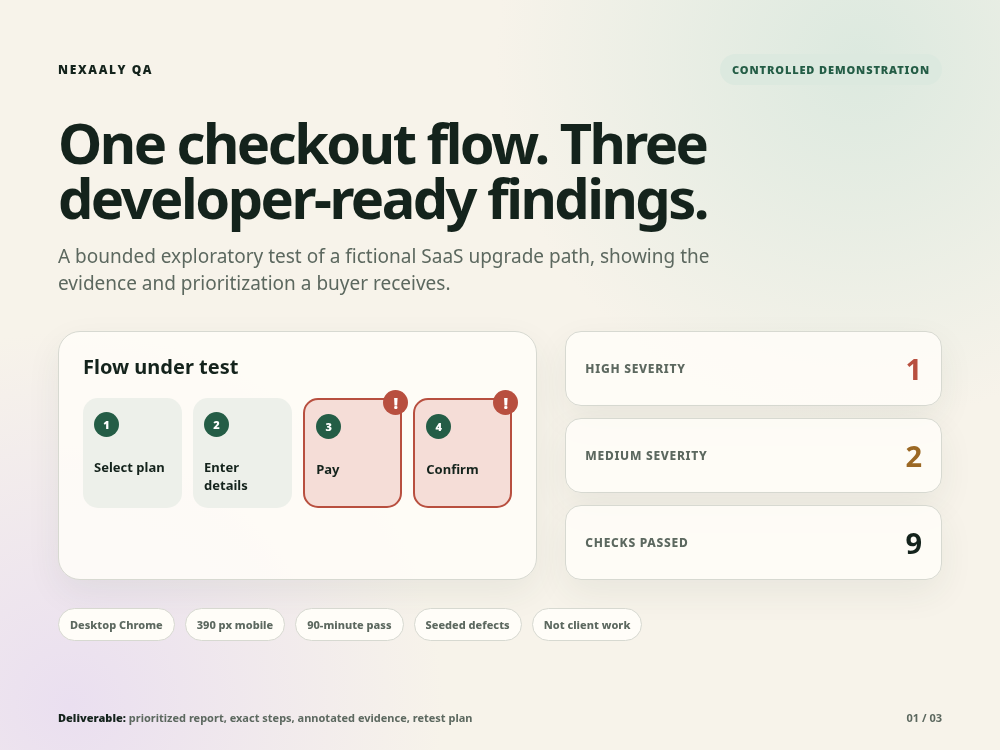
Fictional product, intentionally seeded defects
The full report format
The public sample contains three reproduced findings and nine passed checks for a controlled checkout demonstration. It is not client work and not a testimonial.
Common ways this test becomes useless
- Testing every page and finishing none of the journeys deeply.
- Changing browsers, accounts, and data without recording the state.
- Reporting opinions as defects without an expected outcome.
- Using production actions without explicit authorization and safe test data.
- Collecting screenshots but omitting the steps needed to reproduce them.
- Counting a checkout click, confirmation page, or HTTP 200 as proof that the stored business state is correct.
Questions founders ask
Should this run on production?
Use a staging environment when possible. Test production only with explicit authority, controlled data, and a path that cannot harm real customers, orders, or records.
What access is needed?
Use a temporary least-privilege test account. Do not place passwords, tokens, private invitation links, or administrator credentials in a contact form or ordinary email.
Does a clean result mean the work failed?
No. A truthful report records passed checks, covered states, and remaining risks. The value is a decision backed by evidence, not a guaranteed bug count.
Is this a security or compliance audit?
No. Critical-flow testing checks functional completion, recovery, state, and usability. Penetration testing, compliance certification, load testing, and broad accessibility auditing require separate scopes.